
Your neck aches by mid-afternoon, and your desk is buried under paperwork, a laptop, and a monitor that barely clears the keyboard. A monitor arm changes that by lifting your screen into your natural line of sight and freeing up precious surface area. If you spend hours at a computer, this simple upgrade can make a noticeable difference in comfort and productivity.
We’ve compared four leading models for this review of the best monitor arms for desks, from budget-friendly options to premium ergonomic designs. Our selections come from trusted brands like VIVO, HUANUO, WALI, and Ergotron. If you’re working with a compact footprint, you may also want to check out our guide to compact standing desks for small spaces to complete your ergonomic setup.

Pros
- Stable support for monitors up to 19.8 lbs
- Easy one hand tilt, swivel, and rotation
- Flexible clamp or grommet mounting options
- Simple installation with included hardware
- Fits most standard 13 to 32 inch VESA monitors
Cons
- May not fit very light or heavy monitors outside the weight range
- Desk edge, thickness, and underside clearance can limit installation
- Not designed for multiple monitor arms
The HUANUO FlowLift is a single monitor arm for 13 to 32 inch screens weighing 4.4 to 19.8 lbs. It suits office workers, students, and gamers who want better desk ergonomics without buying a multi monitor stand.
Its standout feature is easy adjustment. The arm supports tilt, swivel, and 360 degree rotation, so you can move the screen with one hand and keep it stable at the chosen angle.
Build quality is strong for this class. Alloy steel construction, a 5 year manufacturer warranty, and motion testing suggest durability for daily use.
The main drawbacks are compatibility limits. You need a desk edge or grommet hole that fits the mount, and very light or heavy monitors may fall outside the supported range.
For most standard monitors, it is a practical upgrade. It adds flexibility, frees desk space, and keeps setup simple compared with many adjustable arms.

Pros
- Wide screen compatibility for 13 to 38 inch monitors within the stated weight and VESA limits.
- Highly adjustable height, tilt, swivel, and rotation.
- Two secure mounting choices with C-clamp and grommet base.
- Toolless desk clamp and included hardware make setup straightforward.
- Integrated cable clips help keep power and AV cords tidy.
Cons
- The single pole design may feel less stable than dual-arm or heavy-duty premium arms for very large ultrawide screens.
- Requires VESA 75x75 or 100x100 mounting holes on the back of the monitor.
- Desk thickness and edge clearance can limit C-clamp placement on some work surfaces.
The VIVO STAND-V001 is a single monitor arm designed for 13 to 38 inch screens, including ultrawide displays up to 38 inches. It is aimed at desk users who want adjustable positioning without committing to a multi-arm setup.
Its standout feature is the range of movement, with height adjustment up to 16 inches, tilt, swivel, rotation, and portrait or landscape orientation. The included C-clamp and grommet base options also make it adaptable to common desk styles.
Build quality is practical, using alloy steel and aluminum construction with a detachable VESA plate and cable management clips. Installation is generally straightforward, and the mount feels suitable for everyday office or home use within the stated weight limit.
The main limitations are typical for a single-arm design: it needs VESA mounting holes, and very large ultrawide screens may benefit from a more rigid arm. For most users, it is a capable, flexible desk mount that improves ergonomics and frees desk space.
Pros
- Exceptional value for a full-motion monitor arm with robust construction.
- Highly adjustable, offering significant height, extension, tilt, and rotation for optimal ergonomics.
- Includes both C-clamp and grommet mounting options for versatile desk compatibility.
- Effective built-in cable management helps maintain an organized workspace.
- Strong weight capacity supports most modern monitors up to 26.4 lbs.
Cons
- Installation is primarily recommended for solid wood desks, which may limit use on glass or certain composite desks.
- The arm may feel substantial for very lightweight monitors, though it provides excellent stability.
- Users must carefully check their monitor's VESA pattern, weight, and curvature to ensure compatibility before purchase.
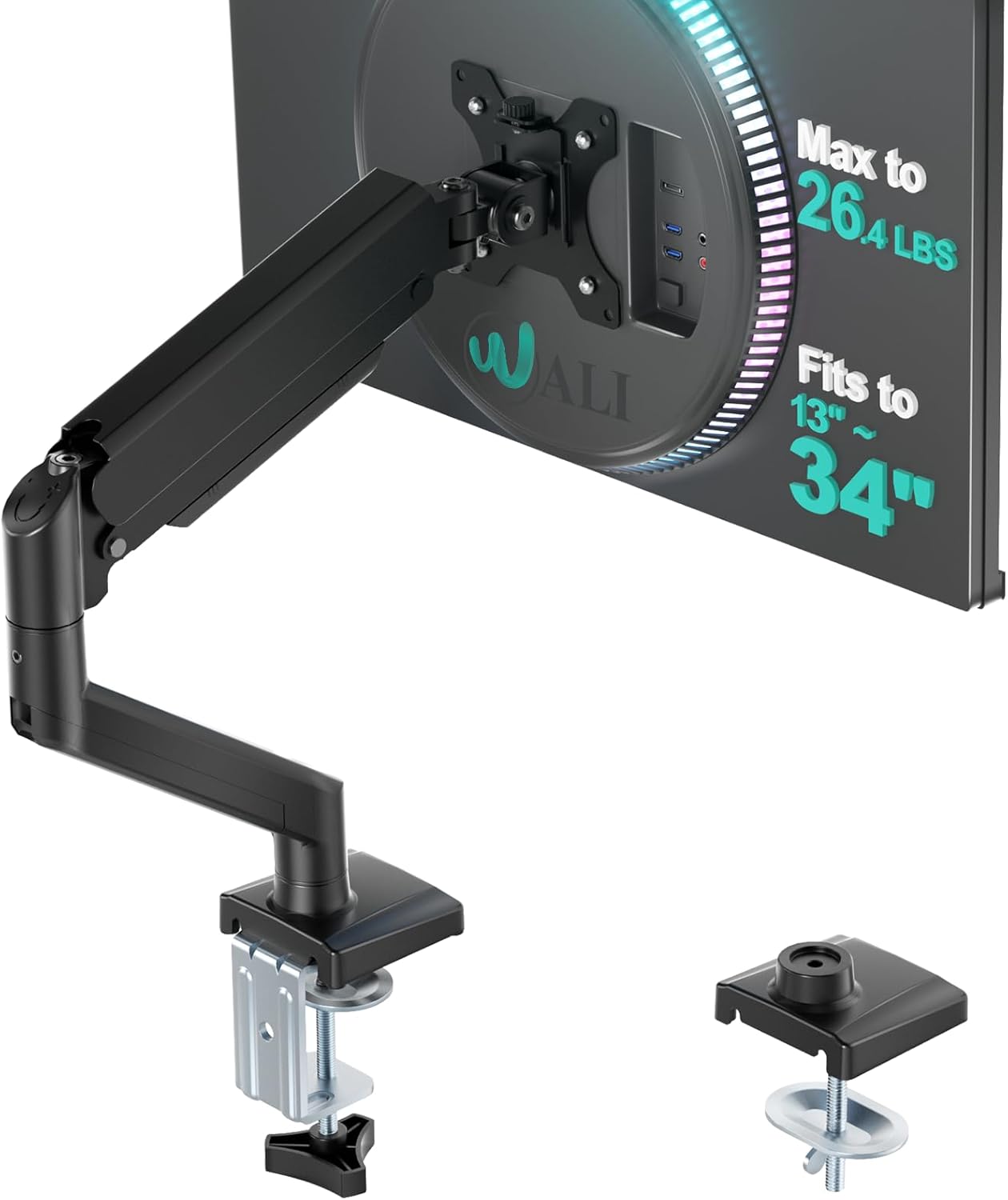
The WALI GSMP001N Single Monitor Arm is a premium desk mount designed for users seeking to elevate their workspace, both literally and figuratively. It is ideal for remote professionals, gamers, and anyone using a single monitor who values ergonomics and a clean desk aesthetic. By lifting your screen off the surface, it instantly creates a more spacious and organized environment.
Its standout feature is the extensive range of motion, which includes height adjustment, extension, tilt, and 360-degree rotation. This allows you to position your monitor exactly at your natural eye level, whether you are sitting or standing, significantly reducing physical strain during long work or gaming sessions. The real-world performance is smooth and stable, holding the monitor firmly in place once adjusted.
Design and build quality are strong points, with a metal construction that feels solid and reliable. The wider VESA head and tighter panel enhance stability, preventing screen wobble. The integrated cable management is a thoughtful touch, neatly routing wires through the arm to eliminate the tangled mess common to many desks.
A potential drawback is the installation recommendation for wooden desks, which might exclude users with glass or certain lightweight tabletop materials. Additionally, while versatile, it is crucial to verify your specific monitor's VESA compatibility and weight to ensure a proper fit, as not all screens are suitable.
Final Verdict: The WALI Single Monitor Arm delivers outstanding functionality and ergonomic benefits at a compelling price point. Its robust construction, flexible adjustments, and space-saving design make it a highly recommended upgrade for transforming a cluttered desk into an efficient, comfortable workstation.
Model: WALI GSMP001N
Compatibility: 13-34 inch screens (Flat: up to 26.4 lbs, Curved: up to 19.8 lbs)
VESA Patterns: 75x75mm, 100x100mm
Motion: 360° Rotation, +180°/-180° Swivel, +70°/-45° Tilt
Adjustment Range: Extends 19.3", Raises 17.3" above desk
Mounting: C-clamp & Grommet Base (Desk thickness: 0.39" to 2.76")
Material: Metal
Color: Black
Warranty: 10 Years

Pros
- Handles large ultrawide monitors within the supported weight and depth range
- Smooth height, tilt, and rotation adjustments improve everyday comfort
- Metal construction feels stable and durable
- Flexible desk clamp fits a wide range of desk thicknesses
- Cable management keeps the setup looking tidy
Cons
- Grommet mount is sold separately
- Not suitable for monitors heavier than 22 pounds or deeper than 3.6 inches
- Requires a desk edge with enough clearance for the clamp
The Ergotron LX Pro Premium is a single monitor arm designed for users who want a cleaner and more adjustable workstation. It supports flat, curved, and ultrawide screens up to 34 inches, so it fits many productivity and gaming setups.
Its standout feature is broad compatibility. The arm handles monitors from 4 to 22 pounds and accepts VESA 75x75mm or 100x100mm patterns. The two piece desk clamp also works with most desks from 0.4 to 2.4 inches thick.
In use, the articulating movement is the main benefit. You can lift the screen up to 18.3 inches above the desk, rotate it 360 degrees, and tilt it 85 degrees. That makes it easier to switch between solo work, sharing content, or vertical layouts.
The matte black metal construction looks sleek and feels built for long term use. Built in cable management helps reduce visual clutter, while the 10 year warranty adds confidence. The modular design also supports optional accessories if you want to expand your setup.
One limitation is that the grommet mount is not included, and very deep or heavy monitors may not be compatible. Overall, this arm is a strong choice for users who want a premium, flexible monitor mount for a modern desk.
Brand: Ergotron
Product type: Single monitor desk mount
Color: Matte Black
Material: Metal
Maximum supported screen size: 34 inches
Weight capacity: 4 to 22 pounds
VESA compatibility: 75x75mm and 100x100mm
Desk clamp thickness range: 0.4 to 2.4 inches
Vertical lift: 13 inches
Rotation: 360 degrees
Tilt: 85 degrees
Warranty: 10 years
This arm is a good fit if you use a single large monitor and want more desk space and better ergonomics. It works especially well for ultrawide displays, curved screens, and setups that need frequent angle changes.
Check your monitor weight, depth, and VESA pattern before buying. If you need a permanent desk mount, plan for the separate grommet accessory. If you want a flexible setup, the included desk clamp is the simpler option.
Below, you’ll find a side-by-side comparison of the four monitor arms we evaluated. Use the table to narrow down your options, then read on for detailed buying advice.
What to Look for in the Best Monitor Arms for Desks
Choosing the right monitor arm for your desk doesn’t have to be complicated. These are the four factors we consider most important when evaluating any model.
Weight Capacity and VESA Compatibility
The first thing to check is whether your monitor uses a standard VESA mounting pattern. Most screens from the last decade use a 75x75mm or 100x100mm hole spacing, but larger displays sometimes require a bigger pattern. If your monitor doesn’t have VESA holes, you’ll need an adapter plate, which adds cost.
Next, weigh your monitor. The WALI Adjustable Single Monitor Arm is the most generous in this roundup, with a maximum capacity of 26.4 pounds for flat screens and support for panels up to 34 inches. The VIVO Single 13 to 38 inch Ultrawide Monitor Arm handles up to 22 pounds and fits ultrawide displays as large as 38 inches, which is rare at this price point.
For smaller and lighter displays, the HUANUO FlowLift Single Monitor Mount supports 4.4 to 19.8 pounds, while the Ergotron LX Pro Premium Monitor Arm handles 4 to 22 pounds. A monitor that’s too heavy for the arm will sag over time, so err on the side of a higher capacity.
A quick measuring tape and a look at your monitor’s spec sheet will settle any compatibility questions. If you’re between two sizes, go with the arm that has a higher capacity and a wider range of adjustment.
Adjustability and Range of Motion
A good monitor arm should let you position your screen exactly where you need it. That means smooth height adjustments, tilt, swivel, and rotation. Look for an arm that lets you switch between landscape and portrait orientation without disassembling anything.
The Ergotron LX Pro is the benchmark here, with 13 inches of lift and 85 degrees of tilt, plus 360 degrees of rotation. The HUANUO FlowLift tilts from -50 to +85 degrees, swivels 90 degrees in either direction, and rotates 360 degrees, giving you plenty of flexibility for a budget-friendly arm.
The VIVO arm offers up to 16 inches of height adjustment along its center pole, and the WALI extends 19.3 inches from the desk and raises your screen 17.3 inches. If you frequently alternate between sitting and standing, a taller adjustment range is essential. Pair your arm with a compact standing desk to get the full ergonomic benefit.
Smooth gas-spring motion is what sets premium arms apart from budget picks. The Ergotron and HUANUO both use gas springs for effortless height changes, while the VIVO and WALI rely on manual tension adjustments that still work well once dialed in.
Mounting Options: C-Clamp vs Grommet
Almost every monitor arm includes two ways to attach it to your desk: a C-clamp that grips the edge, and a grommet mount that fits through a hole in the desktop. C-clamps are quicker to install, but grommet mounts are more stable on thick desks or desks with a rim.
The HUANUO FlowLift and WALI Adjustable Single Monitor Arm both come with C-clamp and grommet bases. WALI fits desks up to 2.76 inches thick, while HUANUO supports desks up to 3.54 inches. The VIVO hand-tightens to desks as thick as 3.25 inches, and its clamp is designed for toolless installation.
The Ergotron LX Pro uses a two-piece desk clamp that fits desks 0.4 to 2.4 inches thick, and a separate grommet mount is available as an accessory. If your desk has a crossbeam or an uneven underside, a grommet mount is the safer choice. Measure your desk before ordering.
If your desk is made of glass or particle board, a C-clamp can leave marks or even crack the surface. In that case, a grommet mount is often the safer route. Check the thickness and material of your desktop before you order.
Build Quality and Cable Management
A wobbly monitor arm is worse than no arm at all. We look for sturdy construction, precise joints, and dependable tension adjustment. The best arms stay exactly where you put them, with no sagging over time.
The HUANUO FlowLift uses automotive-grade materials and has been validated through 20,000 motion cycles, which suggests it can handle years of daily use. The WALI features a wider VESA head and a tighter-fitting panel to reduce wobble. The Ergotron LX Pro comes with a 10-year warranty and is built to commercial standards, making it a top choice for heavy users.
Cable management is another detail that makes a big difference. The VIVO arm includes detachable cable clips on the arm and center pole, keeping HDMI and power cables tidy. The WALI has built-in guides along the arms. A clean setup not only looks better but also makes it easier to adjust your monitor without cords snagging.
A monitor arm’s finish also matters for aesthetics. Matte black arms like the Ergotron blend into most setups, while the VIVO and WALI offer a simple, professional look. If your desk is visible to clients, a clean design may be worth the extra investment.
Desk Score Breakdown
We score every product against the same seven weighted criteria used across this site, explained on our How We Review page. For an accessory like a monitor arm, “size and fit” covers screen compatibility and “setup” covers mounting. A criterion we cannot verify from the manufacturer specifications is marked “not rated” and the final score is recalculated across the criteria that do have data.
HUANUO FlowLift Single Monitor Mount: Desk Score 7.7
- Build and materials (20%): 7.5, automotive-grade components per the listing
- Stability and adjustability (20%): 7.5, gas-spring lift with -50 to 85 degree tilt, 90 degree swivel, and 360 degree rotation
- Size and fit (15%): 7.0, fits 13 to 32 inch screens up to 19.8 lbs
- Price and value (15%): 9.0, the best value here: full articulation and a gas spring at the lowest functional price
- Setup (10%): 8.0, C-clamp and grommet base included
- Features (10%): 7.5, built-in cable management along the arm
- Warranty and support (10%): not rated, no duration listed
Who shouldn’t buy it: anyone running an ultrawide monitor over 32 inches.
VIVO Single 13 to 38 Inch Ultrawide Monitor Arm: Desk Score 7.7
- Build and materials (20%): 7.2, standard build with a toolless desk clamp
- Stability and adjustability (20%): 7.0, manual tension rather than a gas spring, holds up to 22 lbs
- Size and fit (15%): 8.5, fits ultrawide monitors up to 38 inches, rare at this price
- Price and value (15%): 8.5, the lowest price here and the only one rated for true ultrawide screens
- Setup (10%): 8.0, toolless clamp with a grommet mount alternative
- Features (10%): 7.0, detachable cable clips, landscape and portrait rotation
- Warranty and support (10%): not rated, no duration listed
Who shouldn’t buy it: anyone who wants gas-spring height adjustment instead of manual tension.
WALI Adjustable Single Monitor Arm: Desk Score 7.6
- Build and materials (20%): 7.0, a reinforced frame and a wider VESA head to cut down on wobble
- Stability and adjustability (20%): 7.5, the highest flat-screen capacity in this guide at 26.4 lbs
- Size and fit (15%): 7.5, fits screens up to 34 inches
- Price and value (15%): 9.0, the lowest price here combined with the highest flat-screen capacity
- Setup (10%): 8.0, C-clamp and grommet base, fits desks up to 2.76 inches thick
- Features (10%): 7.0, built-in cable guides, a 19.3 inch extension and 17.3 inch lift
- Warranty and support (10%): not rated, no duration listed
Who shouldn’t buy it: anyone mounting a heavy curved monitor; the curved-screen rating drops to 19.8 lbs.
Ergotron Upgraded LX Pro Premium Monitor Arm: Desk Score 8.0
- Build and materials (20%): 9.0, commercial-grade construction from an established ergonomics brand
- Stability and adjustability (20%): 8.5, 13 inches of lift, 85 degree tilt, and 360 degree rotation
- Size and fit (15%): 7.5, fits screens up to 34 inches and 22 lbs
- Price and value (15%): 6.0, priced several times higher than the other three arms in this guide
- Setup (10%): 7.5, a two-piece clamp fits desks 0.4 to 2.4 inches thick; the grommet mount is a separate accessory
- Features (10%): 8.0, modular accessories and streamlined cable management
- Warranty and support (10%): 9.0, backed by a 10-year warranty, the only one of the four with a stated term
Who shouldn’t buy it: anyone on a tight budget; it costs several times more than the other three picks here.
Final Thoughts
For most people, the HUANUO FlowLift™ Single Monitor Mount is the sweet spot, offering strong adjustability, easy installation, and proven reliability at a reasonable price. If you need the best-in-class ergonomics and long-term warranty, the Ergotron – Upgraded LX Pro Premium Monitor Arm is the premium pick that will hold your ultrawide monitor securely for years. Whichever you choose, remember to pair it with a desk setup that matches your workflow.
Frequently Asked Questions
What VESA size do I need for a monitor arm?
Most monitors use a 75x75mm or 100x100mm VESA pattern. Check the back of your screen for four screw holes and measure the distance between them. The arms we reviewed all support these common patterns, but your monitor must also fall within the arm’s weight range.
Can a monitor arm hold an ultrawide monitor?
Yes, but you need an arm rated for the size and weight. The VIVO Single 13 to 38 inch Ultrawide Monitor Arm is designed for ultrawide displays up to 38 inches, while the Ergotron LX Pro supports screens up to 34 inches. Always double-check the weight capacity before installing.
Are monitor arms worth it for a standing desk?
Absolutely: a monitor arm makes it easier to match your screen height to your eye level when you change from sitting to standing. In 2026, more people are pairing monitor arms with compact standing desks to create flexible workstations. Our small-space standing desk guide can help you find the right base for your monitor mount.
How do I install a monitor arm?
Most arms come with a C-clamp and a grommet base, and installation takes just a few minutes. Attach the bracket to your desk, secure the VESA plate to your monitor, and then adjust the tension to keep the arm stable. The included instructions walk you through each step, and no specialized tools are needed.


Write Your Review
No reviews yet. Be the first to share your experience!